


(Four business areas)
Four areas. Fourteen capability groups
Open an area to jump straight to the capability groups inside it.




%22%3E%3Cpath d=%22M143 14C143 21.732 136.732 28 129 28L19 28L19 10C19 4.47717 23.4772 0 29 0L129 0C136.732 0 143 6.26801 143 14Z%22 fill=%22white%22%2F%3E%3Cpath d=%22M3.68483 45.8079L13.9634 42.4824C15.3677 42.0281 15.8129 40.2613 14.7917 39.1957L7.83858 31.9403C6.78647 30.8424 4.94254 31.2738 4.48662 32.7244L1.1612 43.3053C0.674233 44.8547 2.13954 46.3078 3.68483 45.8079Z%22 fill=%22white%22%2F%3E%3C%2Fg%3E%3Ctext x=%2262%22 y=%2233%22 text-anchor=%22middle%22 dominant-baseline=%22central%22 font-family=%22'Inter Tight'%2CInter%2C'Segoe UI'%2CArial%2Csans-serif%22 font-weight=%22700%22 font-size=%2216%22 fill=%22black%22%3EOperations%3C%2Ftext%3E%3C%2Fsvg%3E)











Find
Leads
Growth OS goes beyond incoming inquiries: it looks for companies worth developing around your products, target markets and buyer profiles, and qualifies the opportunity — weak evidence is marked for checking, never guessed. Approved prospects move into Sales Desk with their sources, research, product interests and next actions — no waiting for an inquiry, no duplicate records.
Outputs: prospect lists, contact details, opportunity briefs and outreach plans. Core workflows are developing; live sources and outreach require authorization.
Company Research
Company Research
Company Research
Company size, markets, products and channels, with the source and date of every fact.
Trade Intelligence
Trade Intelligence
Trade Intelligence
Purchase records and supplier changes, read from lawfully authorized trade data and public sources.

Reorder Signals
Reorder Signals
Reorder Signals
Reorder windows judged from purchase cycles; weak evidence is marked for checking, never invented.
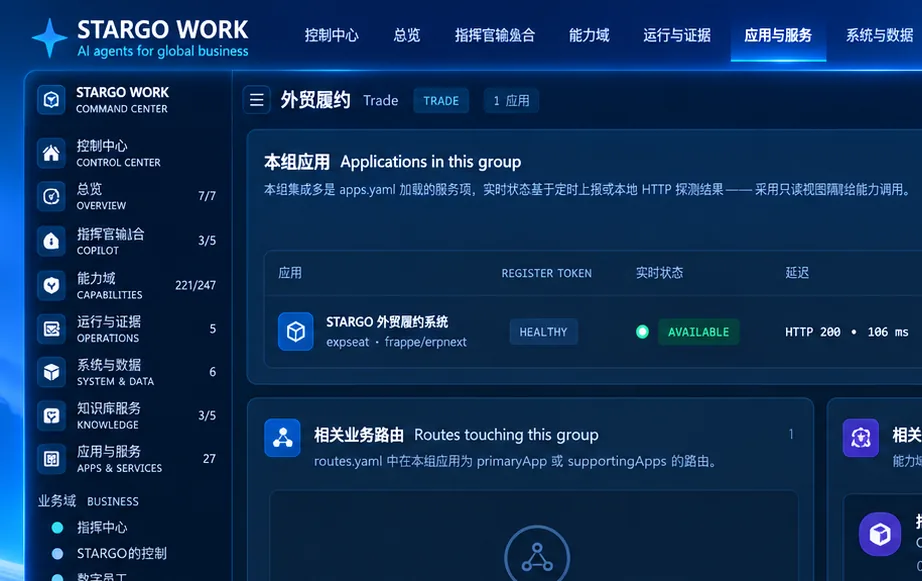
Key Decision Roles
Key Decision Roles
Key Decision Roles
Buyers and influencers identified with identity evidence, then handed to Sales Desk once approved.
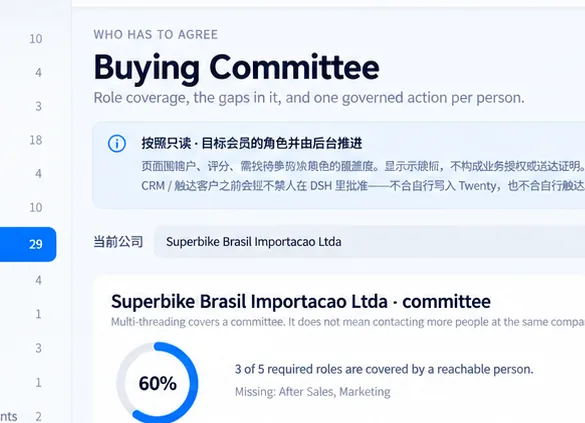


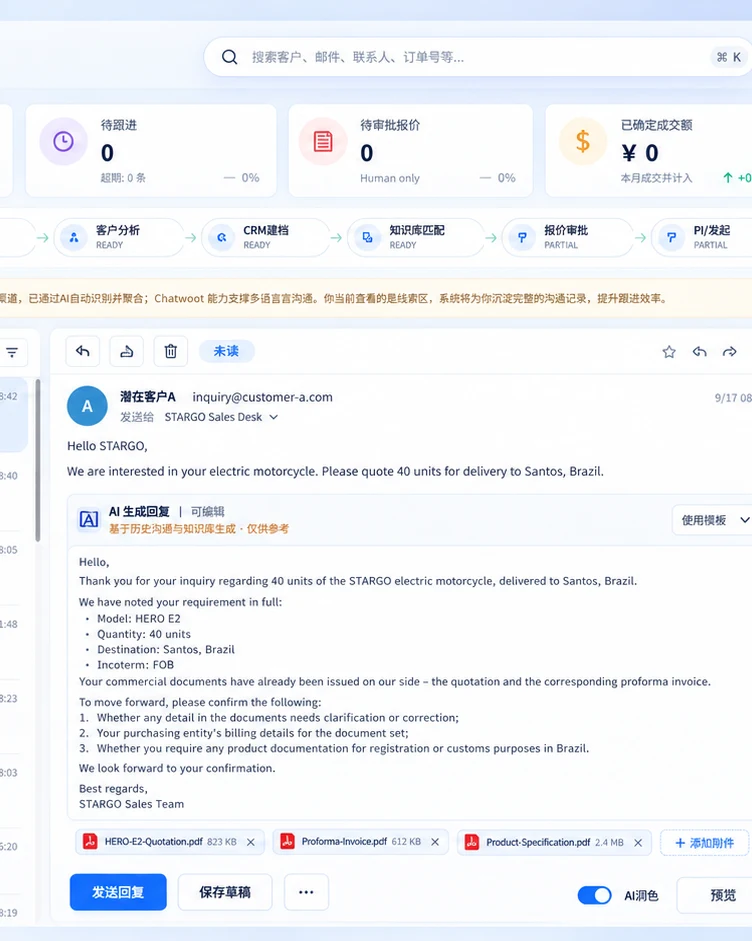
Sales Desk: from customer to order
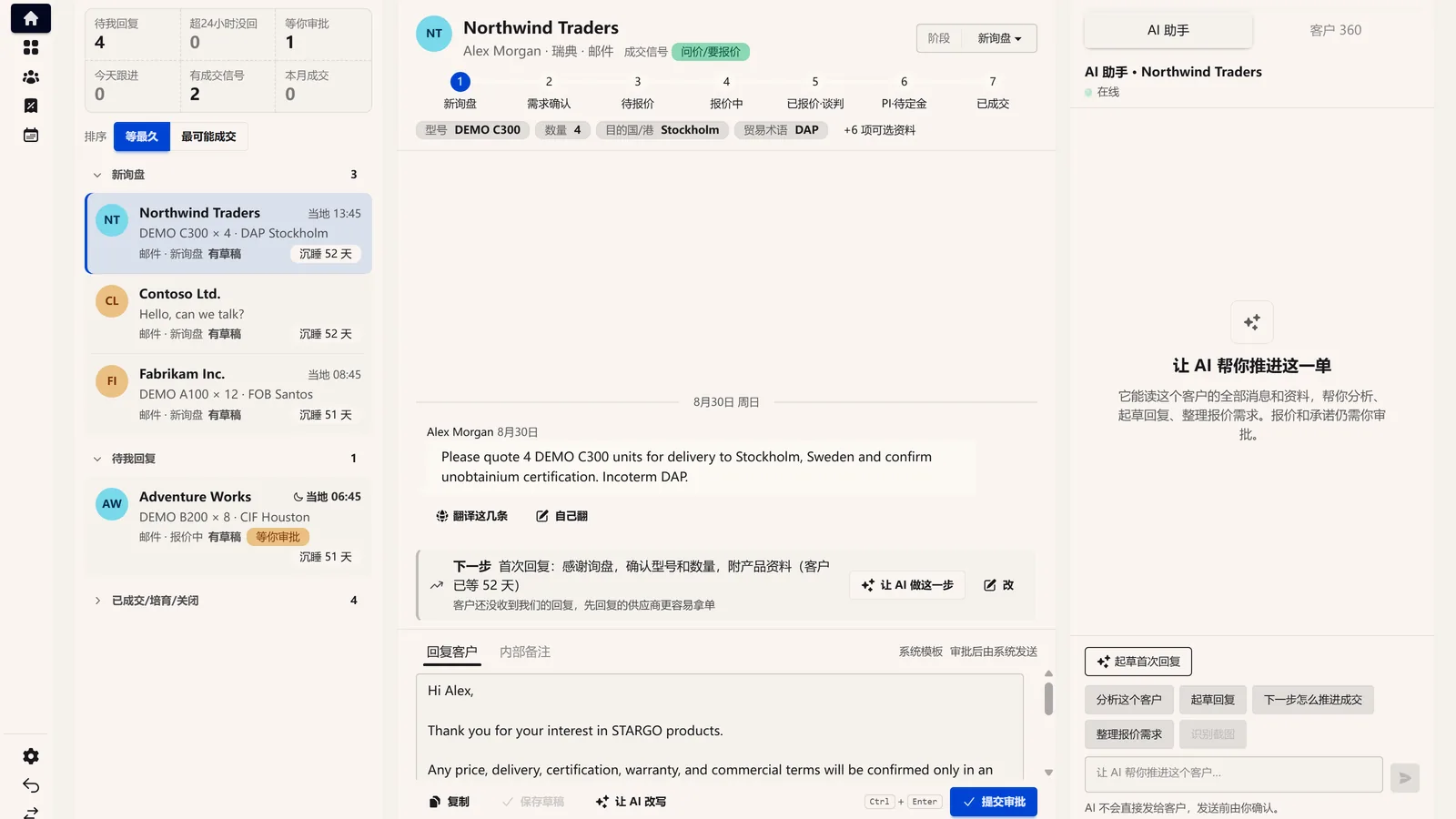
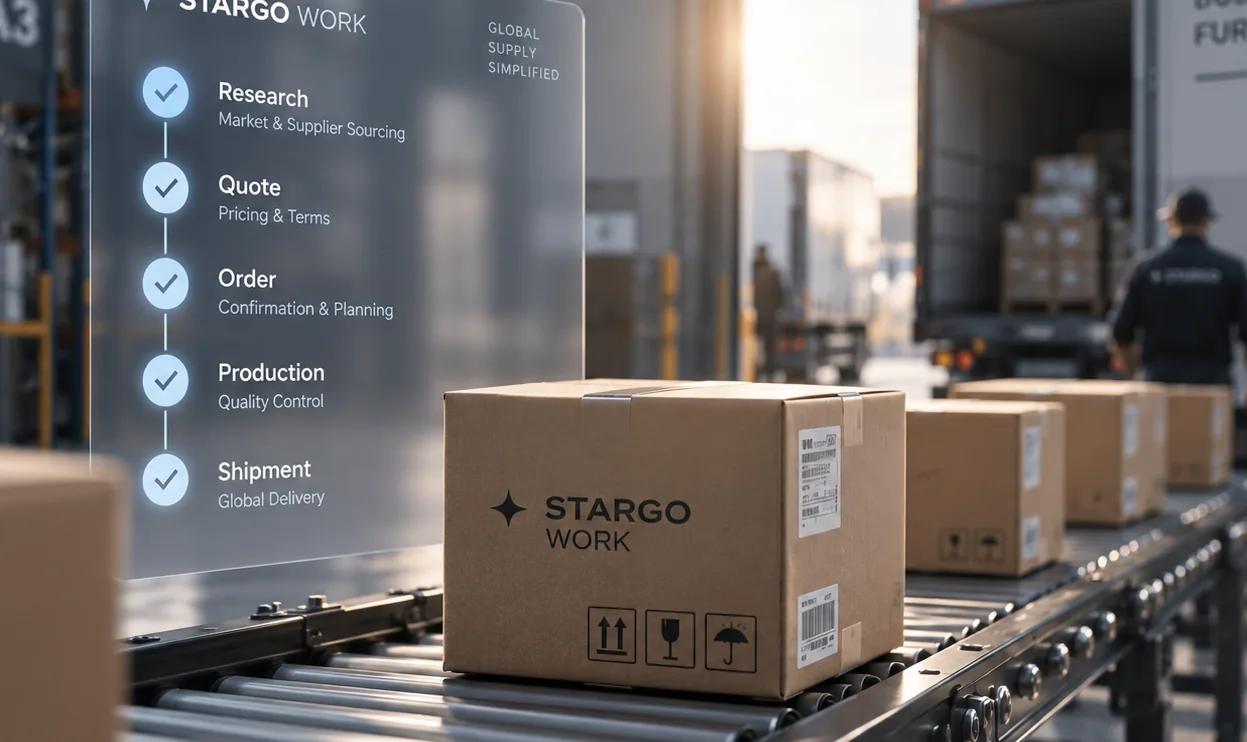
Sales Desk takes the prospects Growth OS has approved and the inquiries from every connected channel. One intake receives them, requirements are read from messages and attachments, and the customer view keeps context and history. Together they serve replies, product matching, follow-up, quotations and PI, through to the order handoff. Outputs: customer records, structured requirements, product fit, review-ready replies and continuous sales history. The workspace exists; messaging, price sources and business handoffs are integrated and validated one by one.

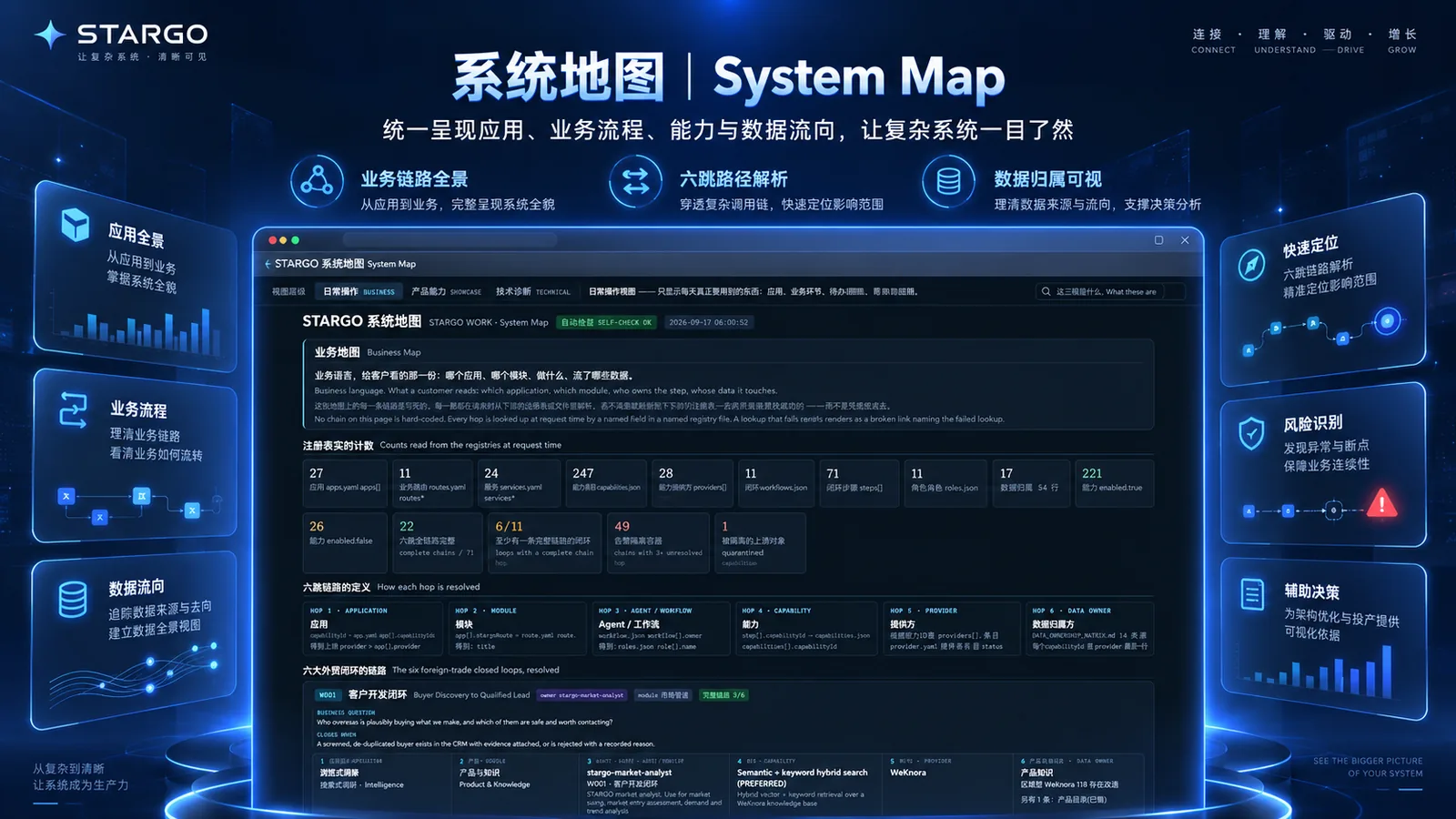
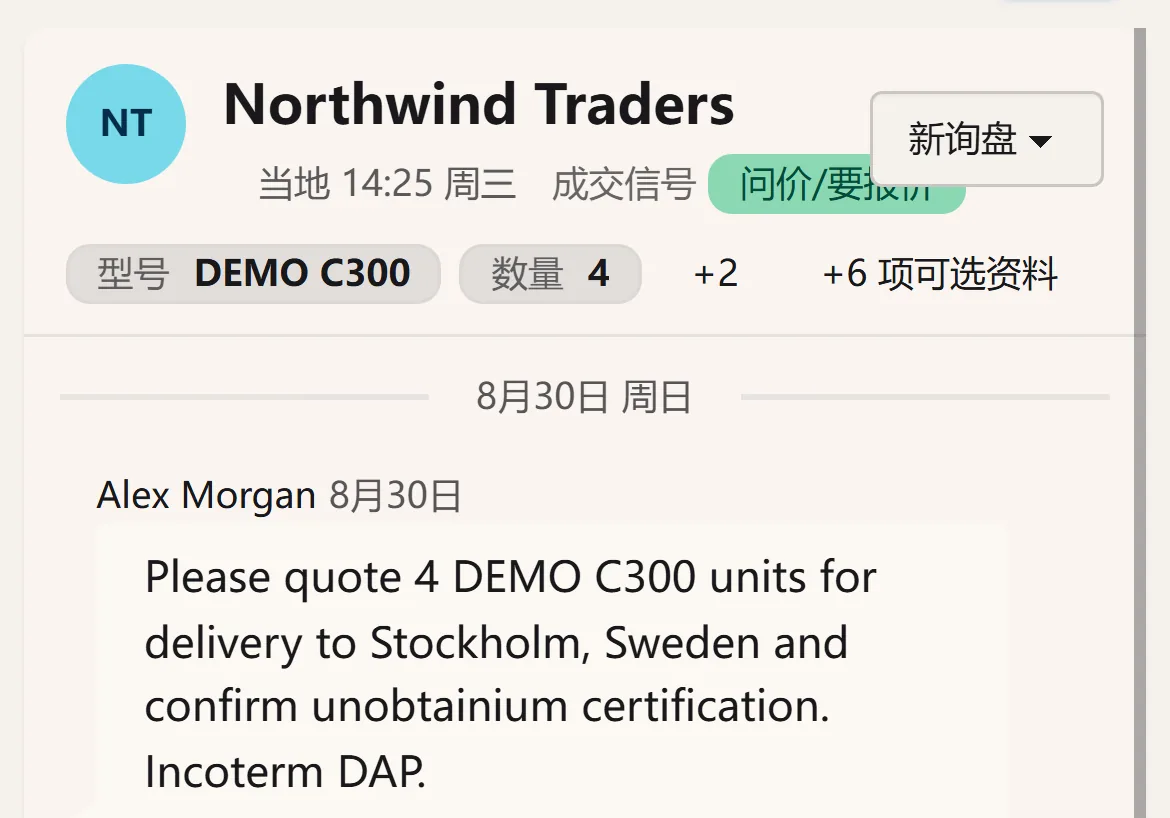


Quote drafts are built from product configuration, quantity, packaging, currency and trade terms. Prices come from the company’s approved pricebooks and quote history; discounts or margins beyond the limits need an authorized approver, and AI never invents a price. Every version is kept and comparable, and the approved one becomes the PI and the contract, with commercial invoices, packing lists and other documents prepared for human review. An approved quote is not a sent one, and a sent quote is not a received one; each is confirmed on its own. Quotes and PI are evolving; live prices, contracts, signatures and documents depend on connected enterprise systems. What your company can use is confirmed item by item during scoping. For the product facts behind a price, see Products & enterprise knowledge.
Product records, specifications, bills of materials and suppliers stay consistent, and order demand links to purchasing and deliveries. ERP and commerce foundations exist; cross-system work and AI actions need enterprise-specific configuration and validation.



See available stock and shortages; track production tasks, material needs, quality checks, packing and lead times.

Orders, deposits, balances, invoices and reconciliation reminders line up; payments are authorized by people, never by AI alone.

Prepare and check commercial invoices, packing lists, certificate of origin / Form E materials, bills of lading, certifications and export tax-rebate records; official filings are submitted by authorized people, and issuance and approval stay with the authorities.

Freight quotes, bookings, tracking, arrival estimates and exceptions, with shipping documents following delivery; the scope depends on the forwarding and logistics systems connected.

Warranty, returns, spare parts, dealer support, commerce and reorder suggestions — the business after the sale, delivered in stages as systems connect.

Product records, specifications, bills of materials and suppliers stay consistent, and order demand links to purchasing and deliveries. ERP and commerce foundations exist; cross-system work and AI actions need enterprise-specific configuration and validation.
See available stock and shortages; track production tasks, material needs, quality checks, packing and lead times.
Orders, deposits, balances, invoices and reconciliation reminders line up; payments are authorized by people, never by AI alone.
Prepare and check commercial invoices, packing lists, certificate of origin / Form E materials, bills of lading, certifications and export tax-rebate records; official filings are submitted by authorized people, and issuance and approval stay with the authorities.
Freight quotes, bookings, tracking, arrival estimates and exceptions, with shipping documents following delivery; the scope depends on the forwarding and logistics systems connected.
Warranty, returns, spare parts, dealer support, commerce and reorder suggestions — the business after the sale, delivered in stages as systems connect.
Images
Video
(05)
1. AI Images & Editing
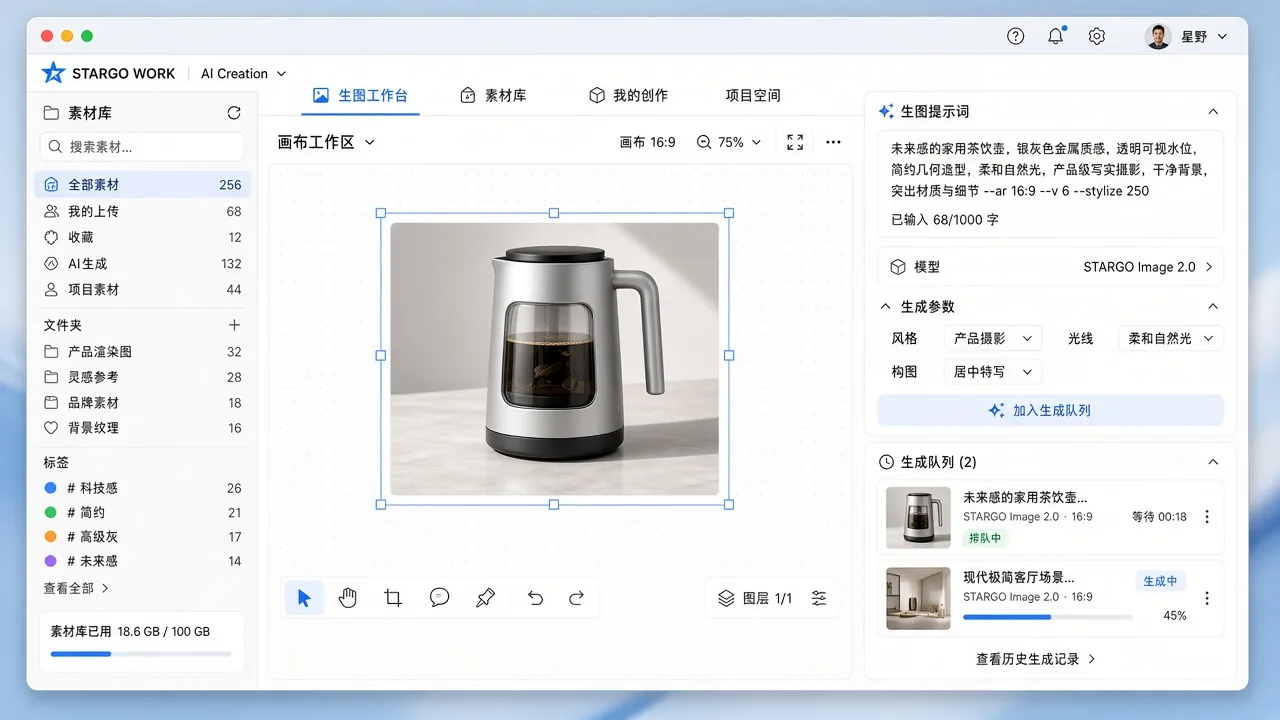
Provide a written brief, product reference images or existing assets, and generate and edit images in one workflow: product heroes on white, scenes, posters, benefit graphics and advertising concepts.
A shared brand kit — logo, colors and tone — and verified product facts guide the work. Inaccurate appearance, specifications or text are checked and corrected locally, reducing attractive but misleading content. You review image versions you can compare and keep refining.
Availability: The creative workspace is present; one-click marketing-kit production and local checks are being integrated.
2. One-click Video
- Brief
- Script
- Storyboard
- Visuals
- Voiceover
- Captions
- Review and export
Start with product facts, reference images, audience, language, duration and aspect ratio. Organize the brief into a video project covering scripts, storyboards, visuals, voiceover, captions, review and export, while retaining assets, task status and versions.
Before generation, the workflow prepares a production plan for review: the hook, benefits, shot order, pacing and call to action. Visuals are grounded in verified product and brand information, with quality checks. Multilingual narration, music, branding, end cards and specification overlays are added in post-production, using available tools and authorized assets. Generation budgets, approvals and task status are recorded with the project.
Product explainers, advertisements, brand films and social clips use the same verified product and brand context, in portrait, landscape and square formats; a failed shot is redone on its own rather than regenerating everything.
Availability: What you receive is a playable, exportable video file, not merely a completion message. The production plan can be reviewed before generation, finished videos are reviewed before they are published, and generation runs within the services and credits the company enables.
4. Product Marketing Kits & Catalogs
Choose the product, target market, sales platform and language, then plan hero images, benefit graphics, detail shots, specification graphics, brand visuals and supporting copy in one coordinated workflow, with fewer repeated instructions.
The same product facts extend into detail pages, catalogs, product introductions and sales collateral. Logos, specifications, prices and text stay in checkable, controlled layouts, ready to confirm item by item and to reuse across sales, websites, commerce and social channels.
Availability: The creative workspace is present; one-click marketing-kit production and local checks are being integrated.
5. Multilingual & Social Content
Start from confirmed product information, target markets and languages. Write social, product and sales copy and localize it, so one product story runs through product pages, sales decks and social feeds.
Campaign copy and publishing materials are prepared around the same story and organized by market and channel into text and visuals you can review.
Availability: The creative workspace is present; one-click marketing-kit production and local checks are being integrated. Publishing to external channels requires separate authorization.
6. Website & Search Content
Provide product information, target markets and the websites you sell through. Copy for product and market pages is prepared and localized into your target languages.
Content is planned for how search engines and AI search read it: clear structure, checkable facts and cited sources. The aim is to help buyers find you and AI search quote you accurately; rankings and citations are not guaranteed. You receive a content plan and page copy to approve before anything goes live.
Availability: The creative workspace is present; one-click marketing-kit production and local checks are being integrated. Publishing to external channels requires separate authorization.
7. Assets, Versions & Short-form Editing
Keep briefs, production steps, references, images, video and audio in one creative workspace. Each project retains its versions and asset library, and proven production workflows can be reused.
Existing product footage can be cut into short social clips, with long-video repurposing, vertical reframing and caption adaptation connected here. Every change is versioned; the goal is to redo only the shot or section that needs it rather than starting over. You get a versioned asset library and clips cut with the capabilities enabled for you.
Availability: The creative workspace is present; one-click marketing-kit production and local checks are being integrated. Repurposing, reframing and caption adaptation depend on enabled capabilities.
Run the work with an AI team





01 Workspace & Business Overview
Organize applications, files, goals, tasks and business priorities together.
The workspace
Work in a company-specific desktop where business applications, files, digital employees, connected accounts and authorized tasks share one workspace.
- Multi-app desktop and file workspace Organize work through a desktop, taskbar and multiple application windows, bringing files and business entry points together with less switching between disconnected tools.
Availability Browser-first delivery; voice, automation, external actions and additional clients depend on enabled scope. Native Windows and Mac clients, mobile experiences and mini-programs are phased roadmap items.
The owner’s overview
Business owners need more than busy AI employees: they need visibility into work, cost, customer progress, blockers and decisions requiring their authority.
- Business-owner cockpit Summarize customers, opportunities, quotations, orders, follow-ups, approvals and exceptions using connected data, explicitly showing unavailable metrics.
- Mission control and execution visibility Inspect goals, tasks, steps, owners, approvals, failures and results. Distinguish work in progress, submissions, results awaiting checks and verified completion.
- Workforce and teamwork management Use workforce overviews and team assignment views to inspect roles, skills, assignments, workload, history and handoffs, making team responsibilities understandable.
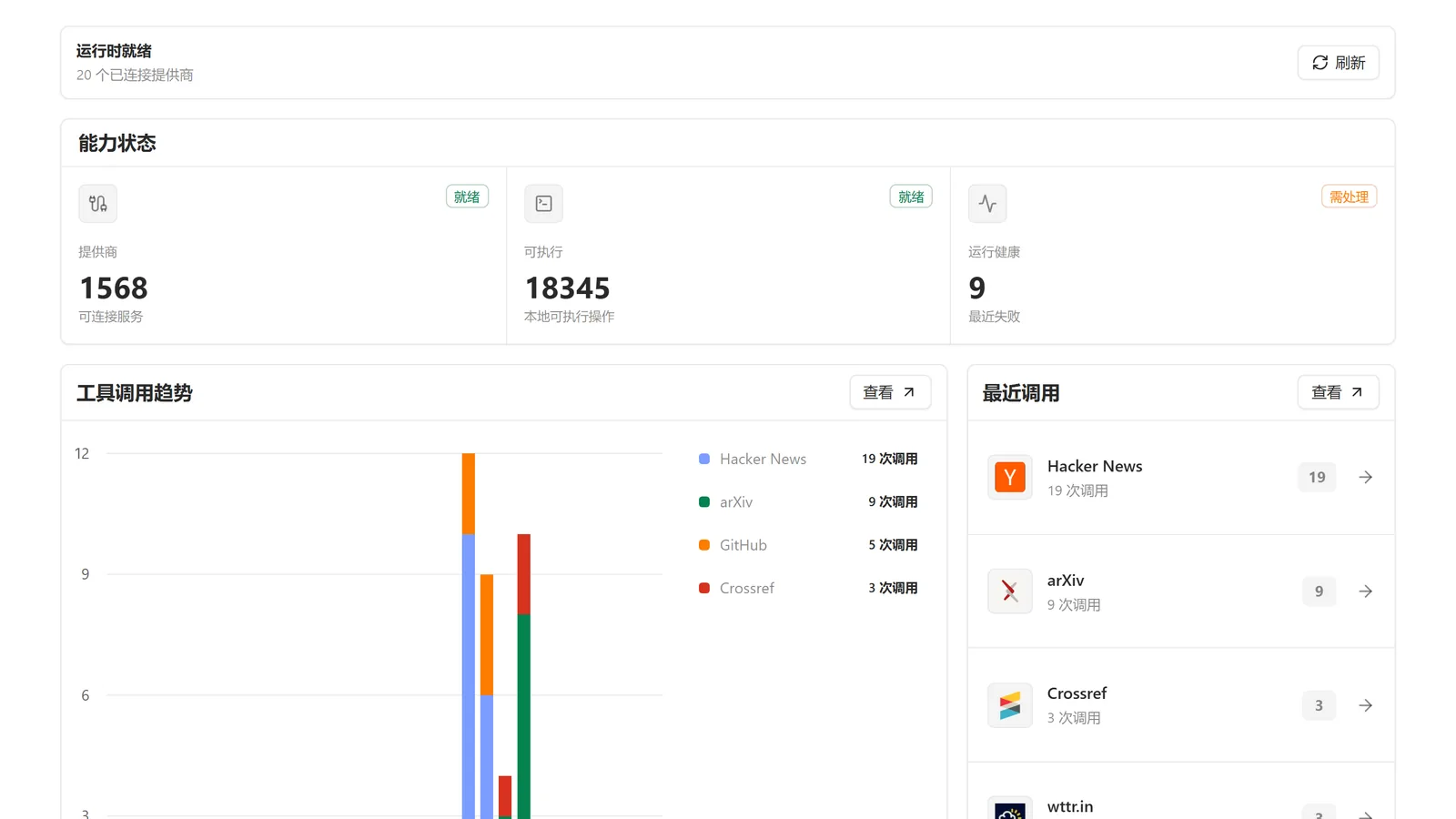
- One control center Bring data synchronization, the app library, the system map, capability and app management, and operating status under one management entry point. System administration remains distinct from the everyday AI work interface.
Business outputs Visible progress, controlled decisions, and traceable ownership and outcomes.
Availability Management foundations exist; dashboards, automated actions and advanced analytics require verified data connections.
Register entries
Boss Cockpit What the business is doing right now, on one screen
Command Center Hand a goal down and watch it carried out
Cloud Workspace The cloud desk your team and its AI employees share
Mission Control Watch long-running work and step in when needed
Execution View Replay what an AI employee did, step by step
System Map How business records and systems connect to each other
App Library The internal apps a company turns on for its teams
Multi-window Desktop Several tasks open at once, without losing place
Mobile Companion Progress and approvals away from the desk; mobile access is phased
Notification Center What changed, and what is waiting on you
Approval Center Every pending decision in one queue
Voice Console Speak a request or create a task, where voice services are enabled
02 Customer Acquisition & Opportunity Research
Research accounts and prioritize opportunities around products and markets.
Go beyond incoming inquiries: discover relevant companies, qualify evidence-backed opportunities and pass approved prospects into the sales process.
- Global prospect discovery Find dealers, importers, wholesalers and target accounts through search, websites, maps, social channels, trade shows and lawfully authorized trade data.
- Market signals and reorder radar Assess purchase history, reorder patterns, supplier changes, hiring and expansion. Flag buying windows and portfolio gaps, while explicitly withholding unsupported conclusions.
- Account research and buying committees Research company scale, markets, products and channels. Identify contacts, emails, social profiles and buying roles, with source, freshness and identity evidence.
- Opportunity scoring and prioritization Combine product fit, market fit, buying signals, contact coverage, risk and commercial value into account profiles, opportunity briefs and prioritized prospect lists.
- Outreach playbooks and reactivation Prepare multilingual emails, messaging and follow-up plans. Support trade-show follow-up, dormant-lead reactivation, reorder opportunities and outreach-result analysis.
- Approved handoff into Sales Desk Hand approved prospects to Sales Desk with source evidence, research, product interests and next actions, without waiting for an inbound inquiry or creating duplicate records.
Business value: replace scattered prospecting with targeted, evidence-backed and prioritized customer development.
Business outputs Prospect lists, contact details, opportunity briefs, priorities and next actions.
Availability Core workflows are developing; live sources and outreach require authorization.
Register entries
STARGO Growth OS From market signals to approved prospects handed to Sales Desk
Trade Signal Accounts Turns observed trade activity into workable accounts
Importer Reorder Radar Estimates which importers may be due to reorder
Competitor Customer Graph Uses available trade records to see who buys from comparable suppliers
Buying Committee Intelligence Who decides, who influences and who signs
Dealer Opportunity Discovery Finds distributors whose range has a gap you fill
Map-Based Dealer Discovery Finds distributors and resellers by territory
Opportunity Decisions Recommends pursue, park or drop, with the reason
Dealer Opportunity Brief A one-page case for approaching a distributor
Outreach Playbooks Builds the approach for this account and market
Six-Factor Opportunity Scoring Ranks accounts on product fit, market fit, buying signals, contacts, risk and value
Account Research Collects company evidence and cites where it came from
Trade Intelligence Reads available trade records for demand and direction
Website AI Sales Engineer Answers product questions on your site and captures the lead
Dormant Lead Reactivation Brings quiet accounts back with a reason to talk
Trade Show Afterburner Turns a stack of badges into scheduled follow-up
CRM Automatic Lead Creation Records the approved account in CRM with an owner, without duplicates
Attribution & Growth Analytics Which actions led to inquiries and orders; advanced analytics depend on resources
03 Market Channels & Account Discovery
Distinguish authorized research sources, conversation channels and content platforms.
Research sources, conversation channels and publishing platforms serve different purposes. Within authorized integrations, STARGO WORK connects their activity to shared customer, sales and follow-up workflows.
- Discover accounts Search, company websites, maps, social sources, trade shows and lawfully authorized trade data help find dealers, importers, wholesalers and target accounts, with the source of each lead retained.
- Carry conversations Business email, WhatsApp, Alibaba.com and website inquiries carry the conversations with customers; what arrives on each channel joins one customer context, so whoever takes over sees the whole history.
- Publish content Website, social and product content support brand communication. Multilingual copy and search content can be prepared in advance; publishing to external channels requires separate authorization.
Availability Connections depend on authorized accounts and the enabled service scope. A listed platform is not a promise of default access or full read-and-write permissions.
Register entries
Community Demand Scouting Be found in the communities where buyers ask questions
AI Search Visibility Content that search engines and AI answers can find and cite
Decision-Maker Outreach Reaches decision-makers on professional networks, with authorization
Social Demand Signals Reads social demand signals in your categories
Alibaba.com Inquiry Intake Inquiries land on the customer record
Video Channel Signals Tracks what buyers search and watch in your category
WhatsApp Sales The messaging channel many overseas buyers use, connected with authorization
Email B2B Email outreach and follow-up
Marketplace Connections Connects marketplace listings and messages to one customer record
New Channel Connections New channels join the same customer and sales workflow
04 Inquiries & Customer Conversations
Extract requirements, organize attachments, prepare replies and retain human handoff.
Unify outbound prospects and inbound inquiries around one customer context, from qualification and conversation to quotation, order handoff and retention.
- Unified inquiry and message intake Organize enterprise email, website inquiries, WhatsApp and Alibaba.com messages; distinguish new inquiries, historical traffic, delivery events, spam and unusual leads.
- Requirement and attachment intelligence Extract products, specifications, quantities, markets, budgets and deadlines; organize catalogs, spreadsheets, images and drawings, and flag missing information.
- Knowledge-grounded sales assistance Use verified product knowledge and policies for specifications, minimum order quantities, packaging, certifications, lead times, terms, product matching and multilingual replies. Flag unavailable facts.
- Follow-up tasks and human collaboration Prepare drafts, follow-up strategies, tasks and reminders, with human review, takeover and pipeline management to reduce duplicate outreach by people or AI employees.
Business outputs Structured requirements, product fit, review-ready replies and continuous sales history.
Availability The workspace exists; live channel messaging and business handoffs require individual integration and validation.
Register entries
Unified Inbox Every channel lands in one queue with the customer attached
Email Inquiry Processing Reads an inbound email and opens the right customer record
Alibaba.com Inquiry Handling Handled in the same steps as inquiries from other channels
Website Conversation Turns a site chat into a qualified inquiry
Conversation Center One place for the conversations across channels
Inquiry Intent Detection Separates a real buying request from noise
Spam / Scam Detection Keeps fake inquiries out of the sales queue
Buyer Requirement Extraction Pulls product, spec, quantity and terms out of free text
Company Background Research Checks who is asking before you answer
Customer Risk Signals Flags payment, compliance and credibility concerns early
Product Matching Matches the stated requirement to approved products
Knowledge-Grounded Reply Drafts the answer from approved company sources
Multilingual Reply Replies in the buyer’s language from the same source material
Human Approval & Escalation Sensitive commitments go to the person allowed to decide
Planned Follow-up Prepares the next planned touch, within approved rules, when nothing comes back
Customer Timeline One chronological record of everything said and sent
05 CRM & Customer Context
Keep customers, contacts, opportunities, history, quotations and next steps connected.
CRM is the customer record behind Sales Desk: outbound prospects and inbound inquiries share one customer file, so whoever takes over has the full context.
- CRM and a complete customer view Maintain companies, contacts, sources, tags, owners, opportunity stages, communication timelines, product interests, quotes and orders in a shared customer context.
- Continuity beyond the sale Connect conversations to quotes, proforma invoices, order handoff, delivery and support, preserving win/loss context and repeat-purchase opportunities.
Business flow: approved prospect → CRM → conversation and product fit → quote / PI → order handoff → support and repeat sales.
Business outputs Customer records and continuous sales history.
Availability The workspace exists; live channel messaging and business handoffs require individual integration and validation.
Register entries
Customer CRM The record of customers, opportunities and owners
Account Overview Everything known about the account on one screen
Customer Workspace A shared workspace per customer for people and AI employees
Contact & Opportunity Management Contacts, opportunities and where each one stands
Lead Scoring Puts the accounts worth calling at the top of the list
Product Interests · Quote History · Order History What they asked for, were quoted and actually bought
Customer Tasks & Follow-up Plan The next touch, its date and who owes it
Decision-Maker Mapping Records who decides, who influences and who signs
Customer Evidence Keeps the source behind every claim on the record
CRM Automation Updates owners, stages and next actions by rule, with less manual entry
06 Products & Enterprise Knowledge
Ground work in specifications, pricing policies, certificates, templates and company experience.
The knowledge base captures what the company knows — products, pricing policies, contract templates, policies and experience — so answers and actions can point to a source.
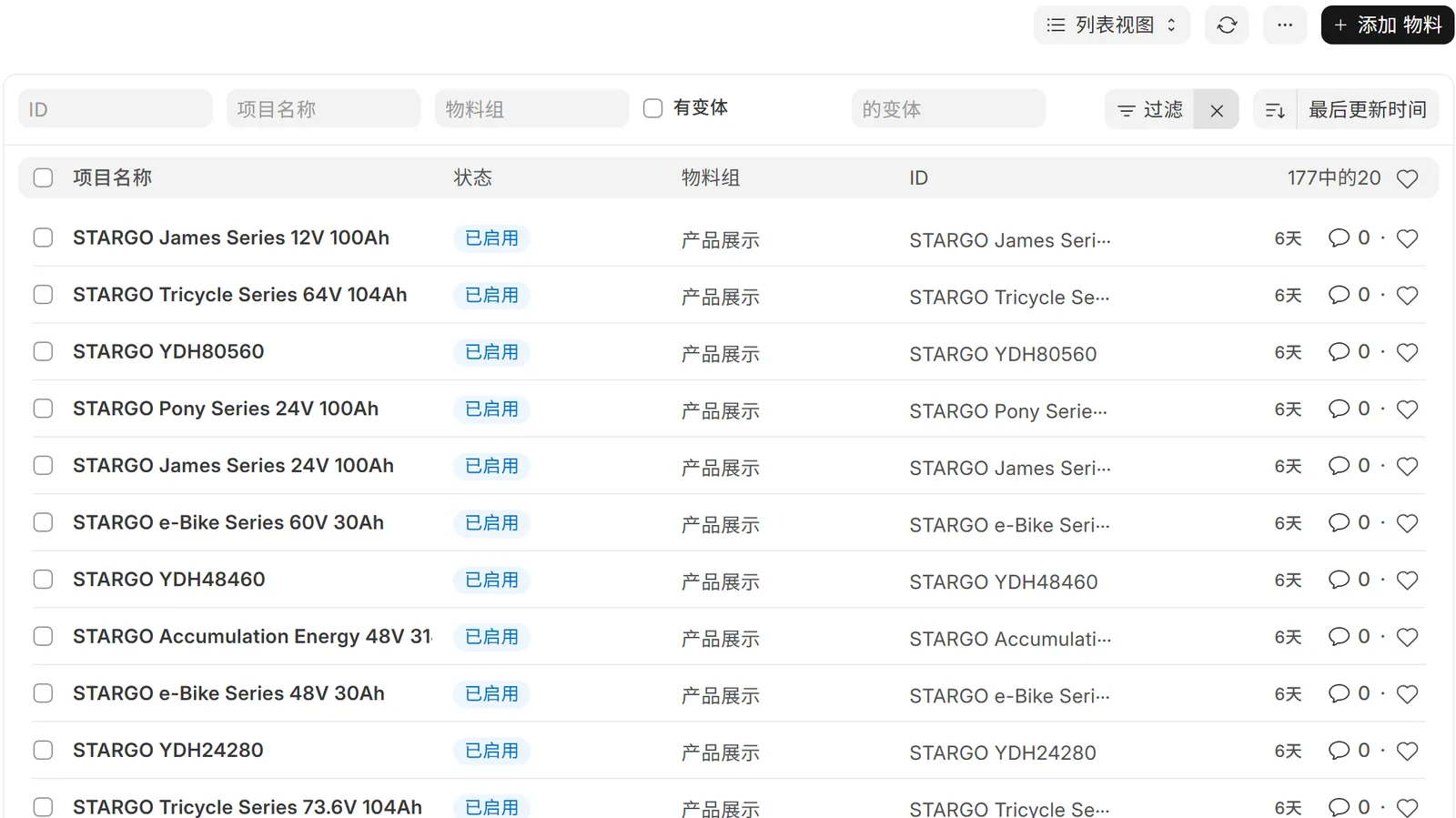
- Enterprise knowledge center Collect company information, catalogs, specifications, pricing policies, certifications, FAQs, sales guidance, templates, policies, standard procedures and project history in a searchable knowledge base.
- Knowledge intake and cited answers Ingest files and authorized sources with provenance, versions, permissions and freshness. Ground answers and actions in evidence and flag conflicts or outdated material.
- Product facts behind quotes and replies Product configurations, specifications, packaging and pricing policies come from enterprise-approved information. Quotations, PI and sales replies draw on the same product facts and flag gaps rather than letting AI invent prices.
Key principle: enterprise-approved data determines prices, answers cite their source, and conflicting or outdated material is checked first.
Business outputs Know which information is current, with the source behind each answer.
Availability Knowledge and business-context foundations exist; richer relationships and enterprise templates are delivered in stages.
Register entries
Enterprise Brain The approved company answer, in one place
Knowledge Center Where approved company answers are kept current
Knowledge Intake Turns documents and files into answerable knowledge
Knowledge Retrieval Finds the passage that answers the question
Source Retrieval Retrieves the passage an answer is based on
Drive & Document Access Reads existing team documents without a migration
Product Intelligence Specifications, options and constraints AI can reason over
Product Center & Library One product record the whole workflow reads
Specifications & Images The technical detail a buyer asks for
Historical Knowledge & Business Rules What the company has decided before, and still applies
Evidence Retrieval Returns the supporting document with the answer
Source-Grounded Answers Flags the gap instead of answering without an approved source
07 Quotations, PI & Commercial Records
Prepare quotations under business rules and preserve approved versions and documents.
Turn disconnected price lookups, spreadsheets and term negotiations into traceable, versioned and approval-controlled commercial workflows.
- Configuration and quotation rules Build quote drafts from product configuration, quantity, packaging, currency and trade terms, using authoritative pricebooks, history, discount permissions and margin guardrails.
- Quotation center Manage templates, drafts, comparisons, approvals and approved quotations. Preserve changes to quantity or configuration to reduce the risk of sending obsolete versions.
- Proforma invoices and commercial confirmation Turn confirmed quotations into proforma invoices, preserving terms, amounts, payment milestones and approved snapshots. Approval and external delivery remain separate controls.
- Contracts and e-signature coordination Coordinate contract templates, terms, versions and approvals; flag inconsistencies and unresolved points. Connect e-signatures and professional review through approved enterprise processes.
- Trade-document preparation and filing Prepare, check and archive commercial invoices, packing lists, certificate of origin and Form E supporting materials, bills of lading, certifications and shipping records. Official issuance remains with authorized bodies.
- Counterparty and transaction-risk assistance Collect identity evidence, screening signals, HS-code references and certification materials, retain supporting sources and escalate review rather than replacing professional compliance judgment.
Key principle: enterprise-approved data determines prices; commercial documents remain traceable; people approve consequential commitments.
Business outputs Quote drafts, approved versions, proforma invoices, commercial terms and traceable documents.
Availability Quotes and PI are evolving; live prices, contracts, signatures and documents depend on connected enterprise systems. An approved quote is not yet a sent one, and a sent quote is not proof the customer received it.
Register entries
Quotation Center Builds the quotation from the inquiry, not a blank sheet
Inquiry → Quote Carries the request straight into a priced draft
Product Configuration & Quantity What exactly is being priced, and how many
Commercial Terms Applies the agreed payment, delivery and warranty terms
Pricing Rules Prices from your configured rules, not from guesswork
Margin Guardrails Stops a quote crossing the margin line without approval
Historical Price Context Shows what this buyer and market paid before
Approval Workflow Routes the exception to the person allowed to decide
Quote Versioning Keeps every version and what changed between them
PI Center Turns the approved quote into a pro forma invoice; sending is a separate step
08 ERP, Orders & Fulfillment
Covers ERP and commerce operations, plus purchasing, stock, production, quality, logistics, collection, trade records and support.
ERP & commerce
Bring sales and operating systems into one desktop, connecting demand with products, materials, inventory, production, orders and commercial records.
- Products, materials and bills of materials Organize product records, specifications, material codes, bills of materials and configuration relationships to support consistent quoting, procurement, production and stock coordination.
- Procurement and supplier coordination Link order demand to purchasing plans, supplier information, sourcing, purchase orders and incoming deliveries. Configure system writes and approvals around enterprise rules.
- Inventory and warehouse operations Provide inventory, warehouse, stock-movement and shortage information so teams can assess availability and support replenishment and exception workflows.
- Production, quality and lead times Coordinate production tasks, material needs, progress, quality checks, packaging and lead times, progressively linking exceptions to sales commitments and customer communication.
- Orders, invoicing and operating records Manage orders, quotations, invoices, multi-currency commercial records and supporting documents; align demand, transactions and fulfillment status to reduce duplicate entry.
- Commerce and dealer operations Support catalogs, selling regions, carts, orders and commerce administration, with brand storefronts, dealer portals and partner coordination connected as required.
Business value: connect winning orders with delivering them, while ERP, commerce and AI retain clear ownership of business records.
Business outputs Check product availability, delivery timing and the consistency of operating records.
Availability ERP and commerce foundations exist; cross-system work and AI actions require enterprise-specific configuration and validation.
Delivery & collection
A sale is a milestone, not the endpoint. Extend coordination across orders, supply chains, documents, payment milestones and customer experience.
- Order and fulfillment milestones Organize deposits, production, quality checks, packaging, shipment and customer confirmation around tasks, owners and deadlines, highlighting delays, missing records and handoff blockers.
- Logistics and shipment coordination Coordinate freight quotes, bookings, tracking, estimated arrivals and exceptions according to the freight-forwarding, logistics and order systems the enterprise connects.
- Finance and receivables assistance Organize deposits, balances, receivables, payables, invoices, reconciliation and order-margin information for reminders and exception checks. AI does not independently authorize payments.
- Export and tax-rebate workflows Track export checklists, stages, document consistency, approvals and reminders; assist rebate preparation and filing coordination without implying automatic official submission or approval.
Service & repeat business
- After-sales, warranty and spare parts Coordinate support cases, warranty, returns, spare parts and resolution progress. Feed recurring issues back into product information, FAQs and sales knowledge.
- Dealer success and repeat purchases Preserve dealer orders, preferences, issues and follow-up plans to support sales enablement, replenishment suggestions, reactivation and repeat-purchase opportunities.
End-to-end objective: acquisition → sales → ERP / fulfillment → finance coordination → support and repeat sales → renewed growth.
Business outputs Order milestones, payment reminders, document checklists, exceptions, service records and reorder follow-up.
Availability Delivered in stages according to the connected order, logistics, finance and service systems. Official filings, certificate issuance and payments stay with the authorized people and bodies; AI does not complete or approve them on its own.
Register entries
Order Management Tracks the order from approved quote to delivery
Trade Fulfillment Follow-up Carries approved commercial detail into fulfillment
Payment Milestones Tracks deposits, balances and what is still outstanding
Production Status & QC Where the goods are, and whether they passed
Packaging & Shipment How it ships, and what travels with it
Commercial Invoice · Packing List Prepared from approved order data, ready for review
Certificate of Origin · Form E Organizes the application material; issuance stays with the authority
Bill of Lading Workflow Keeps shipping documents moving with the shipment
Certification & Battery Documentation Certification and battery files prepared for the destination market
Export Documentation & Workflow Export documents, from preparation to review
Export Tax Rebate Tracks rebate preparation through six stages; filing and acceptance stay with the authorities
CBU / SKD / CKD Workflow Support Keeps built-up, semi- and fully-knocked-down shipments documented separately
09 AI Images, Video & Marketing
Images, marketing kits, product pages, catalogs, video projects and structural adaptation.
AI images & brand content
Go beyond copywriting: use verified products and brand rules to organize images, detail pages, catalogs, advertising assets and multilingual content.
- AI image generation and editing Use text, product references and existing assets in image-generation and editing workflows for product heroes, scenes, posters, benefit graphics and advertising concepts.
- One-click product marketing kits Use product, market, platform and language inputs to plan hero images, benefits, details, specifications, brand visuals and supporting copy in one coordinated workflow.
- Product pages, catalogs and sales materials Prepare detail pages, catalogs, product introductions and sales collateral, keeping logos, specifications, prices and text in checkable, controlled layouts.
- Brand and product consistency Apply a shared brand kit and product facts, checking and locally correcting inaccurate visuals, specifications and copy to reduce attractive but misleading content.
- Creative canvas and asset management Organize briefs, production steps, reference materials, images, video and audio in one creative workspace. Retain versions, an asset library and reusable production workflows.
- Global marketing and search content Prepare website, social, product and sales copy, multilingual localization, search and AI-search content plans and campaigns. Publishing to external channels requires separate authorization.
Business value: turn one verified product knowledge base into reusable assets for sales, websites, commerce and social channels.
Business outputs Organize images, copy and sales materials around consistent product and brand information, with versions and local revisions.
Availability The creative workspace is present; one-click marketing-kit production and local checks are being integrated.
One-click video
Organize scripts, storyboards, assets, visuals, voiceover, captions and export in one project, reducing fragmented tools and manual production handoffs.
- Start from products and a video brief Structure product explainers, advertisements, brand videos and social clips from product facts, references, audience, language, duration and aspect ratio.
- AI direction and storyboarding Plan hooks, benefits, shot order, camera language, pacing and calls to action, giving teams a reviewable production plan before generation.
- Visuals, shots and asset generation Connect image and video generation to project-level shots and assets, grounding production in verified product and brand information with quality checks.
- Voiceover, captions and post-production Coordinate multilingual narration, captions, music, branding, end cards and specification overlays through available tools and authorized assets.
- Project versions and local revisions Retain product facts, references, storyboards, task status and artifact versions, and redo an individual failed shot instead of regenerating everything.
- Preview, export and cost control Organize landscape, portrait and square outputs with budgets, approvals, task tracking and final files. Delivery requires an actual playable, exportable artifact.
From a brief to a playable, exportable video: script, storyboard, visuals, voiceover, captions and export in one project, with versions and costs on record.
Business outputs Finished product explainers, advertisements, brand videos and social clips, with the production plan, version history and generation cost.
Availability Available. Finished videos are reviewed before they are published; generation runs within the services and credits the company enables, using assets you are entitled to use.
Viral creative adaptation
Extract the marketing structure behind an engaging reference video, then adapt it to the enterprise’s own products, brand and target market.
- Reference-video intake Start with a reference video and product assets the enterprise is entitled to use, recording provenance, usage rights and production objectives.
- Creative-structure analysis Analyze hooks, shot functions, duration, pacing, camera language, reveal timing, captions, emotional progression and calls to action rather than copying the original footage.
- Ground the concept in your own brand Rebuild the concept around verified product facts, benefits and brand assets, adapting scenes, markets, language and messaging without importing false claims from the reference.
- Plan three original adaptations Create three distinct adaptations with declared changes to hooks, scenes or messaging angles, making creative comparisons deliberate rather than random.
- Generate, review and prepare formats Pass original scripts, storyboards and assets into the video workflow for branding, captions and format exports. Repurposing and reframing depend on enabled capabilities.
- Creative testing and reusable learning Retain reference structures, variant differences, production cost and feedback. Where channel data is connected, compare performance and build reusable creative knowledge.
Adaptation means borrowing a structure to make original work — not copying footage, faces, voices, music, logos or watermarks. Viral performance is not guaranteed.
Business outputs Structural analysis, original scripts and storyboards, declared variant differences and production tasks — not a guarantee of viral results.
Availability Available, from structural analysis through to finished production. Reference videos must be ones you are entitled to use; original footage is never copied, and viral performance is not guaranteed.
Register entries
AI Creative Studio Organizes the images and sales material a product page needs, from real product facts
Content Creation & Global Website Content Product and market copy for the sites you sell on
Search & AI-search Content Content structured to be found and to be quoted
Multi-language Content The same product story across your target markets
Product · Sales · Social Content One product story across page, deck and feed
AI Image & Video Workflow Product visuals and marketing videos produced to a repeatable workflow
Viral Structure Adaptation Adapts a proven video structure into original work for your product
Viral Video Structure · Scene · Speech · Product Analysis Breaks down a working video’s hook, pacing and messaging
Short-form Clip Editing Cuts product footage into short social clips, where the capability is enabled
10 AI Workforce & Teamwork
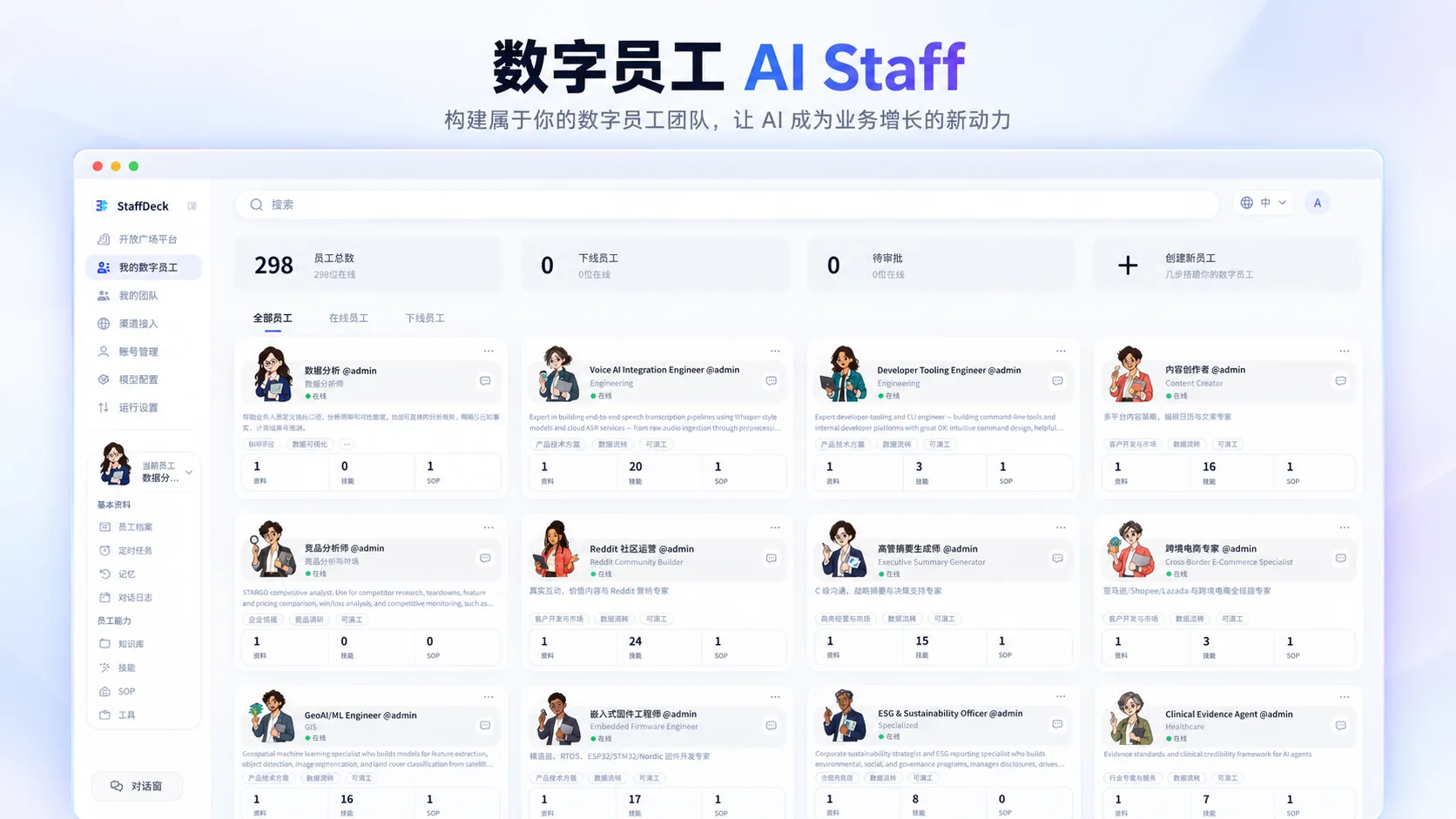
Select, team up and coordinate 288 specialized roles around shared tasks.
288 specialized AI roles
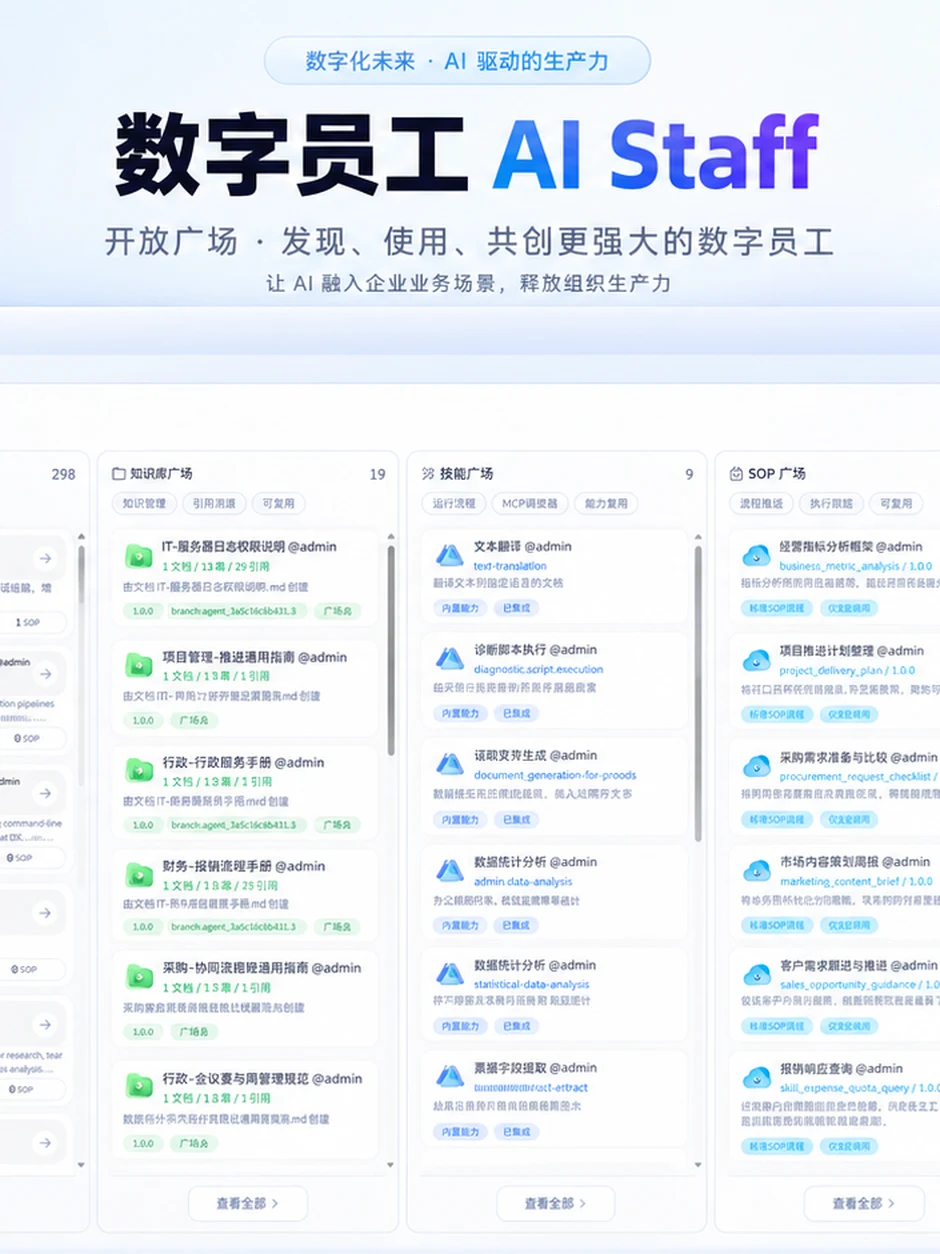
Digital employees cover enterprise support, marketing, sales, service, compliance, supply chain, finance, operations, product and engineering, and professional services.
| Role group | Roles |
|---|---|
| Enterprise essentials | 15 |
| Customer development & marketing | 50 |
| Sales | 16 |
| Customer service | 5 |
| Compliance | 20 |
| Supply chain | 4 |
| Finance | 14 |
| Operations | 19 |
| Product & engineering | 129 |
| Professional services | 16 |
| Total | 288 |
- What a role can contain Configure responsibilities, skills, enterprise knowledge, permitted tools, access, tasks and run history so each role has a defined job, context and operating scope.
- How a team is formed Select suitable employees by role, skills, knowledge, access and task complexity. Give members clear responsibilities across research, sales, products, content or data.
- How an owner delegates Set a business goal, choose employees or a team, inspect tasks and results, and approve key actions. Retain human takeover when judgment or exception handling is needed.
- How results are handed over Track responsibility, deadlines, task status, outcomes and next steps. Members hand work to each other directly, and their outputs are consolidated into a handoff-ready result.
This is a directory of professional AI roles for task-based selection, configuration, delegation and teamwork, not a claim to replace 288 people.
Business outputs A task-selectable role directory with responsibilities, tasks, work history and handoff-ready outputs.
Availability 288 is the role-directory count, not a claim to replace 288 people. The employees enabled, the size of a collaboration and permitted actions depend on configuration, budget and access.
AI employees working together
Assign complex work to a bounded team of digital employees. What matters is information exchange, clear ownership and reliable handoff — not the number of chat windows.
- Task-based team formation Match roles, skills, enterprise knowledge, permitted tools and task complexity to form a focused team with explicit responsibilities.
- Communication between AI employees Support task-focused conversations, directed messages, questions, context exchange and progress notifications to reduce manual copying between AI employees.
- Parallel work and result synthesis Run research, sales, product, content or data subtasks in parallel, then have a coordinating role check and combine outputs into one delivery package.
- Shared facts within permission boundaries Use consistent customer, product, task and approval facts. Sharing context does not grant access to all enterprise data or transfer another employee’s permissions.
- Ownership and durable handoffs Track goals, owners, claims, deadlines, evidence, failures and next actions so work can continue through pauses, human takeover and recovery.
- Bounded work and stop controls Set limits on collaboration rounds, budgets and permitted actions to control looping discussions, duplicate work and unauthorized operations. Retain human approval, pause, takeover and result checks.
Illustrative scenario: research finds accounts, sales plans outreach, product specialists check fit, creatives prepare assets, and a coordinator submits the package for review.
Business outputs Consolidated results, accountable member handoffs and clearly assigned next actions.
Availability Available: employees form teams, message each other, work in parallel and deliver one consolidated result. Collaboration rounds, budgets and permitted actions are capped, work can be stopped at any time, and external actions still need an authorized approval.
Register entries
288 Specialized AI Employees A role directory organized by job, chosen per task
AI Employee Roster Who is available, and what each one is for
Workforce Panel Assign work, watch progress, review what came back
AI Teams & Collaboration Several specialists on one goal, not a single chat reply
AI Employee Communication Employees message each other, ask questions and hand over work, with less relaying by people
Role · Skills · Tools · Memory What an employee does, knows, may use and remembers
Shared Enterprise Context One set of business facts, used within each role’s permissions
Task Delegation · Handoff · Parallel Execution Work splits, moves between roles and runs at once
Scheduled Work Recurring research and follow-up that runs on time
Evidence & Human Approval The record an approver reads before deciding
11 Automation & Everyday Work
Spreadsheets, reports, voice, authorized web tasks and scheduled work.
In the same browser desktop: spreadsheets and reports, voice requests, authorized web tasks, connected business accounts, and repeat work organized into scheduled or event-triggered workflows.
- AI-assisted spreadsheets, documents and reports Organize customer lists, product tables, quotation sheets and business data; assist document creation, translation, summarization and reporting according to enabled tools and templates.
- Voice assistance and voice-to-task workflows Use speech for transcription, conversation, knowledge retrieval, task creation and follow-up. Realtime voice and specific business actions depend on enabled services and enterprise configuration.
- Authorized computer and web tasks Carry out authorized web research, portal work, forms, uploads, downloads and file organization to reduce repetitive manual tasks, without bypassing sign-in, security checks or platform rules.
- Connect business accounts and apps Connect email, drives, CRM, ERP and business platforms through enterprise authorization. Define what can be read, what can be changed and which actions require approval.
- Automation, synchronization and extensibility Organize repetitive work with schedules, events, triggers and workflows, managing synchronization, errors, retries and application extensions around existing business processes.
Business outputs Customer lists, product and quotation sheets, reports, notes, tasks and authorized routine work.
Availability Browser-first delivery; voice, automation, external actions and additional clients depend on enabled scope.
Register entries
AI Employee Setup Where an AI employee gets its tools and limits
Workflow Automation Connects steps across apps without custom code
Scheduled Data Jobs Runs the data preparation and routine jobs a workflow needs
Long-Horizon Control Keeps long-running work on its goal, with pause, resume and handoff
Browser Automation Works web tools within authorization, without bypassing sign-in or security checks
Screen Operation Operates an interface in an authorized environment when integration is not available
Scheduled Routines · Event-Triggered Workflows Runs on a clock, or when the business state changes
Approved Actions & Tool Connections The business actions and tools an AI employee is allowed to use
External Connectors Reaches the systems your team already runs
Sign-in Safekeeping Holds the logins so AI employees never see them directly
12 Business Relationships & Context
Connect customers, products, quotes, orders, business rules and responsibilities.
The knowledge base captures what the company knows. A shared business relationship map explains how customers, products, orders, rules and tasks connect.
- The business relationship map Connect customers, contacts, products, inquiries, opportunities, quotes, orders, documents, tasks and employees so teams can understand relationships, current status and responsibility for next steps.
- Identity and cross-system relationships Identify whether records in different systems refer to the same customer, product or order. Retain sources and matching evidence to reduce duplicate records, mixed customer context and conflicting information.
- Business rules inside execution Connect pricing authority, order conditions, owners, approvals, outcomes and decision history so AI can determine both the next action and whether it is permitted.
- Enterprise data templates and industry adaptation Use structured product, customer and rule templates for onboarding. Stage and review data before connecting authoritative sources, rather than treating uploads as automatically approved facts.
The knowledge base is the company’s reference room; the relationship map connects customers, products, orders and responsibilities.
Business outputs Understand whether it is the same customer, which information is current and who owns the next step.
Availability Knowledge and business-context foundations exist; richer relationships, enterprise templates and new-enterprise onboarding are delivered and validated in stages.
Register entries
Business Relationship Map Links customers, quotes, orders and owners so AI works from the same picture
Cross-system Identity The same customer across every connected system
Customer, Product, Inquiry & Opportunity Records The commercial side of the business, as records
Quote, Order, Document & Task Records The execution side, linked back to the customer
AI Employee & Market Signal Records Who did the work, and what prompted it
Relationships, Permitted Actions & Business Rules How your records connect and what may be done to them
Enterprise Context The company state an AI employee reads before acting
Operational Records Where operating records are kept, and which copy is authoritative
13 Permissions, Approvals & Control
Control access, approval, spending and verified outcomes.
Permissions, approvals and records
What matters is controllable, stoppable, traceable and verifiable work — not an AI message claiming that a task is done.
- Permissions, approvals and data protection Separate company and role access to data and tools, control account authorization and sensitive actions, and require authorized approvals for consequential business operations.
- Activity records, budgets and result checks Keep actions, approvals, evidence, costs and work records. Set usage and budget limits, check actual outcomes, and report, stop or escalate failed work.
Availability Management foundations exist; dashboards, automated actions and advanced analytics require verified data connections.
What is enabled, and how it is accepted
Start with one key workflow. Prepare products, customers, knowledge and business rules, connect accounts, configure roles and approvals, and validate real cases.
- Platform and business applications Desktop, knowledge, CRM, creative, ERP and commerce applications have established foundations and are enabled by configuration. Application access does not prove every cross-system workflow is production-ready.
- Growth OS and Sales Desk The two core workflows continue to evolve. Live data, customer handoffs, commercial prices and external outreach must be connected, authorized and validated for each enterprise use case.
- Video and creative adaptation One-click video and viral creative adaptation are available, and what they deliver is a playable, exportable video file. Finished videos are reviewed before publishing, and generation runs within the services and credits the company enables.
- Teamwork, context and memory AI employees can already form teams, communicate and deliver together, and enterprise knowledge and business relationships have foundations. Enterprise-wide proactive work, unified memory and new-enterprise onboarding require staged delivery and validation.
- Analytics and connected business systems Advanced growth analytics needs suitable resources. Finance, logistics, signatures, customer channels and third-party data depend on enterprise access and systems. Authorized people retain control of filings, payments and professional reviews.
- Industry delivery and phased expansion Industry delivery includes data templates, workflow configuration, onboarding and training. The browser experience is the current focus; mobile and native clients are phased. Actual delivery follows the enterprise’s agreed scope.
Delivery: define goals → prepare context → connect accounts → assign roles and approvals → validate results → expand scope.
Business outputs A defined workflow, required context, clear responsibilities and approvals, and checkable acceptance results.
Availability Capabilities are enabled in phases according to enterprise configuration and agreed scope. This overview does not certify all features as live or newly validated.
Register entries
Human-in-the-Loop Names the decisions a person must still make
Key Action Approval One place where pending decisions wait for their owner
Capability & App Management What AI employees are allowed to use, and on whose behalf
Permission Control · Identity Who can see what, and who can do what
Identity Check Checks identity before any AI employee acts
Activity Records · AI Employee Evidence · Action History What was done, by which AI employee, on whose authority
Guardrails Boundaries an AI employee cannot cross on its own
Company Data Separation Separate data boundaries per company and brand
Failure Handling · Rollback Stops on an error and puts things back
Work Visibility See what AI employees are doing while they do it
14 Retained Experience & Improvement
Retain useful lessons and validate improvements before adoption.
Proactive awareness means tracking business state, goals and deadlines, detecting changes and proposing next actions — not human consciousness or unrestricted autonomy.
- Sense opportunities, risks and commitments Track connected customers, orders, tasks and market signals for opportunities, unanswered leads, approaching deadlines, exceptions and outstanding commitments.
- Goal-driven next-best actions Break goals such as entering a market or progressing an account into steps. Propose actions from current facts and pause when evidence, permissions or consistency are insufficient.
- Durable missions and scheduled checks Trigger checks by events or schedules and preserve goals, plans, tasks and state for pause, resume and handoff. Continued execution depends on configured schedules and operating conditions.
- Enterprise and customer memory Develop layered memory for preferences, conversation summaries, decisions, outcomes and procedures, with provenance, correction and access controls rather than permanently retaining unverified guesses.
- Reflection and skill improvement Extract candidates for better working methods, role skills and business processes from successes and failures. Test, compare and approve them before gradual adoption.
- Check results and retain effective improvements Verify that outcomes meet the goal, not merely that execution occurred. Retain failure evidence for recovery or human handling, and withdraw ineffective changes.
Proactive loop: sense → understand → propose → authorize → act → verify → retain lessons.
Business outputs Surface opportunities, deadlines and exceptions, retain customer and task context, and develop validated working methods.
Availability Foundations exist for goals and controlled improvement; enterprise-wide proactive work and unified memory remain evolving and are validated in stages. People remain responsible for consequential judgment.
Register entries
Improvement Review Where proposed improvements are reviewed and released
Work Observation Watches real execution and records what happened
Outcome Review Turns recorded outcomes into candidate improvements
Skill Refinement Improves a skill against measured results
Pre-release Testing Tests a change, and looks for its weak points, before release
Change Approval No change ships without evaluation and approval
Attempts · Outcomes · Scores What was attempted, what resulted, how it scored
Skill Library · Trials Where a proposed skill is kept and tried out
Side-by-side Trials · Staged Release · Rollback Test a change on a slice, keep it or take it back
Continuous Improvement Reviewed results feed into the next run
(Start with one workflow)
One workflow.
Prove results.
Then expand.
You don’t need to change every department on day one. Choose one priority workflow, prepare its context and rules, connect authorized accounts, assign AI roles and approvals, validate real cases — then expand.
The first workflow
The one that most affects efficiency or growth: prospecting, inquiry follow-up, quotation, order delivery or marketing content.
1
(workflow)
Included:
Choose one business workflow
Prepare product, customer, knowledge and rules
Connect authorized accounts
Assign AI roles and approvals
Validate with real cases
Start with:
one workflow
Request a Demo
Across the company, in phases
Once the first workflow proves useful, more business areas and AI roles open in phases, by configuration and agreed scope.
288
(specialized AI roles)
Included:
Growth OS and Sales Desk, the two engines
ERP, fulfillment and AI creative work
Shared company knowledge and context
288 roles that team up by task
Authorized people approve key decisions
Next:
see pricing
See pricing
(FAQ)
The focus is not the chat format. It is whether the work connects enterprise information, customer history, business applications, ownership, approvals and results. STARGO WORK organizes those elements around a business workflow rather than equating a text answer with completed work.
A complete replacement should not be assumed. STARGO WORK aims to connect existing accounts and information in one workspace. Which systems are retained, integrated or adjusted depends on the enterprise’s software and access permissions.
A capability description is not proof of availability. Some applications have foundations, some require enterprise accounts and live data, and enterprise-wide proactive work and unified long-term memory continue to evolve. Confirm each delivery scope and validate the workflow, not just page access.
Choose one priority workflow. Prepare product, customer, knowledge and policy context, connect authorized accounts, assign roles and approvals, then validate real cases. Expand after that first workflow is proven useful.
(Contact us)
Let’s talk.
By contacting us, you accept our Terms and Privacy Policy.