
288 AI roles: how AI employees team up, talk and deliver
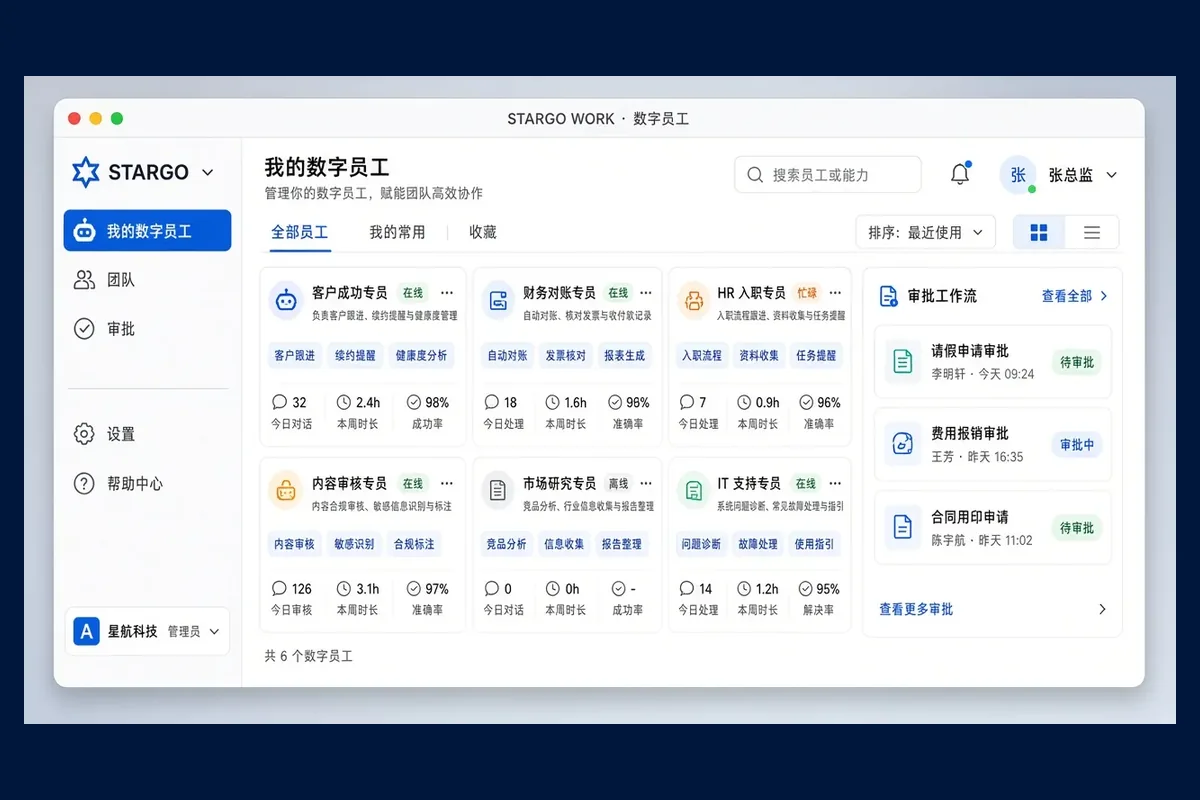
288 is the size of STARGO WORK’s directory of specialized AI roles across ten enterprise functions. For complex work, several AI employees can form a team, message each other, work in parallel and hand a single result — consolidated by a coordinating role — to a person for review. This teamwork is available now.
Which functions do the 288 roles cover?
AI employees are not limited to export sales. The ten role groups break down like this:
Total288 roles
288 counts the roles in the directory; it is not a claim to replace 288 people. Which employees are enabled, how large a collaboration can be and which actions are permitted all follow the company’s configuration, budget and access.
How is an AI employee different from a chat window?
A chat window starts from a blank conversation and ends after the answer. An AI employee can be configured with responsibilities, skills, enterprise knowledge, permitted tools, access, tasks and a run history. It knows what it is responsible for, which company information it may use and which actions must be cleared with a person first.
How is an AI team formed?
Once a manager sets a business goal, suitable employees are matched by role, skills, enterprise knowledge, tool access and task complexity, and a small team is formed with explicit responsibilities: who researches, who plans the sales approach, who checks the product, who prepares the assets and who reviews and coordinates.
How do team members talk to each other?
The business brief
“Develop a new target market.”
Illustrative scenario
Shared missionOne goal, shared customer and product facts
- Market researchFind target accounts
- Sales planningPlan the engagement
- Product specialistCheck product fit
- Creative specialistPrepare sales assets
- Review and coordinationCheck and consolidate
Messages between them
- Market research → Sales planningTarget account list handed over
- Sales planning → Product specialistPlease check the specifications
- Product specialist → Creative specialistBenefits added
Combined output
- Prospect list
- Outreach plan
- Product fit
- Creative assets
- Next actions
Human review
- Clear roles
- Direct messages
- Parallel work
- Shared context
- Durable handoffs
- Pause and take over
Collaboration rounds, budgets and permitted actions are capped, and work can be stopped at any time. Shared task context does not grant other employees’ permissions; external actions need an authorized approval.
- Directed messages: one employee can message or question another directly — asking the product specialist to check specifications, for example.
- Context and handoffs: members add information, pass on questions and hand over results, so people no longer copy every message between them.
- Progress updates: each member’s progress is visible, and a blocked step is easy to spot.
- Parallel work: research, sales, product, content and data tasks run at the same time; the coordinating role checks them and combines them into one delivery package.
Each task keeps its goal, owner, claim status, deadline, evidence, failure reasons and next step, so work continues after a pause, a human takeover or a recovery.
What are the limits on teamwork?
- Collaboration rounds, budgets and permitted actions are capped, which prevents looping discussions, duplicate work and unauthorized operations.
- Work can be stopped at any time; human approval, pause, takeover and result checks always remain.
- Shared task context does not open all company data, and it never gives one employee another employee’s permissions.
- External actions, such as messaging a customer, need an authorized approval.
How does an owner delegate?
Five steps: set the business goal → select employees or a team → assign work → inspect the outputs → approve key actions. When judgment is needed or something unusual happens, a person takes over.
See the role directory and the team scenario on the AI Workforce page, and AI workforce and teamwork in the catalogue.
Want to see an AI team take on one of your tasks? Request a demo.
Frequently asked questions
What does “288 digital employees” mean?
It denotes 288 specialized, task-selectable roles across ten enterprise role groups — not trade sales alone. Each role can be configured with responsibilities, knowledge, skills and access, and several can form a team, message each other and complete one task together. The number is not a claim to replace 288 people; the employees enabled, the size of a collaboration and permitted actions depend on configuration, budget and access.
How do AI employees work together?
They divide a shared goal into roles, message each other, ask questions and hand over context, and work on research, products, sales or content in parallel. A coordinating role checks and consolidates the results. Ownership, deadlines, next steps and human takeover stay visible; rounds and budgets are capped, and the work can be stopped at any time.
Does a company enable all 288 roles at once?
Not necessarily. Which employees are enabled, how large a collaboration is and which actions are allowed follow the company’s configuration, budget and access. You can start with the few roles one workflow needs.
Can an AI team message customers on its own?
External actions need an authorized approval. The team can prepare prospect lists, outreach plans and message drafts; whether anything is sent is decided under company rules.